Overview

Integrate your models and build analysis workflows to assess credibility of simulations to support critical decision-making.




Why VIMSEO?
Making decisions based on simulations is a key enabler for reducing product development lead-time and costs. However, Simulation-driven product development or Qualification/Certification by analysis approaches require credible simulations, particularly in the context of critical applications.
Notably, the ASME V&V 10-2019 guideline describes a framework for Verification, Validation and Uncertainty Quantification (VV&UQ) that should be considered for rigorous credibility assessment.
While these guidelines provide a foundation for the assessment of simulations credibility, their practical application still requires significant effort and knowledge from engineers and experts, including the definition and implementation of suitable organisation, methodologies, and infrastructure. Experts from industry or academia, engineers and also decision makers should share knowledge, capabilities, information and evidences to build simulations credibility. They need an operational and extensible VV&UQ framework.
This is where VIMSEO comes into play.
Installation
Install the latest version with pip install vimseo.
See pip for more information.
NOTE
You can use uv for installation. uv is an extremely fast
Python project manager. To install, use:
uv pip install vimseo
Pay attention that running the above command will install VIMSEO globally on your system.
To isolate VIMSEO in an environment using uv, first create a Python environment:
uv venv env
and activate it:
source env/bin/activate
uv prints when creating the environment).
Then install:
uv pip install vimseo
What is VIMSEO?
A Virtual Testing Framework to provide the foundational architecture and toolbox needed to integrate modelling and simulation capabilities, set up traceable analysis workflows and provide tailored visualisation to support decision-making.
VIMSEO is a software library that supports the implementation of a Verification, Validation and Uncertainty Quantification (VV&UQ) process for the credibility assessment of Modelling and Simulation (M&S) capabilities. By providing a framework for the integration of M&S capabilities, a toolbox for performing VV&UQ analyses, a workflow engine to define and execute custom analysis processes, as well as a database to share and visualise results with stakeholders, VIMSEO is the perfect companion to set up simulation-driven decision-making.
VIMSEO provides the following building blocks:
-
A wrapper for model integration. It is based on the Multi Disciplinary Optimisation (MDO) library GEMSEO. Since VIMSEO models derive from GEMSEO Disciplines, they can be readily use in MDO scenarios. VIMSEO model wrapper is particularly relevant for models based on Finite-Element Analysis (FEA) and in general any model using mesh discretisation. A wrapper specific to models based on Abaqus FEA software is available.
-
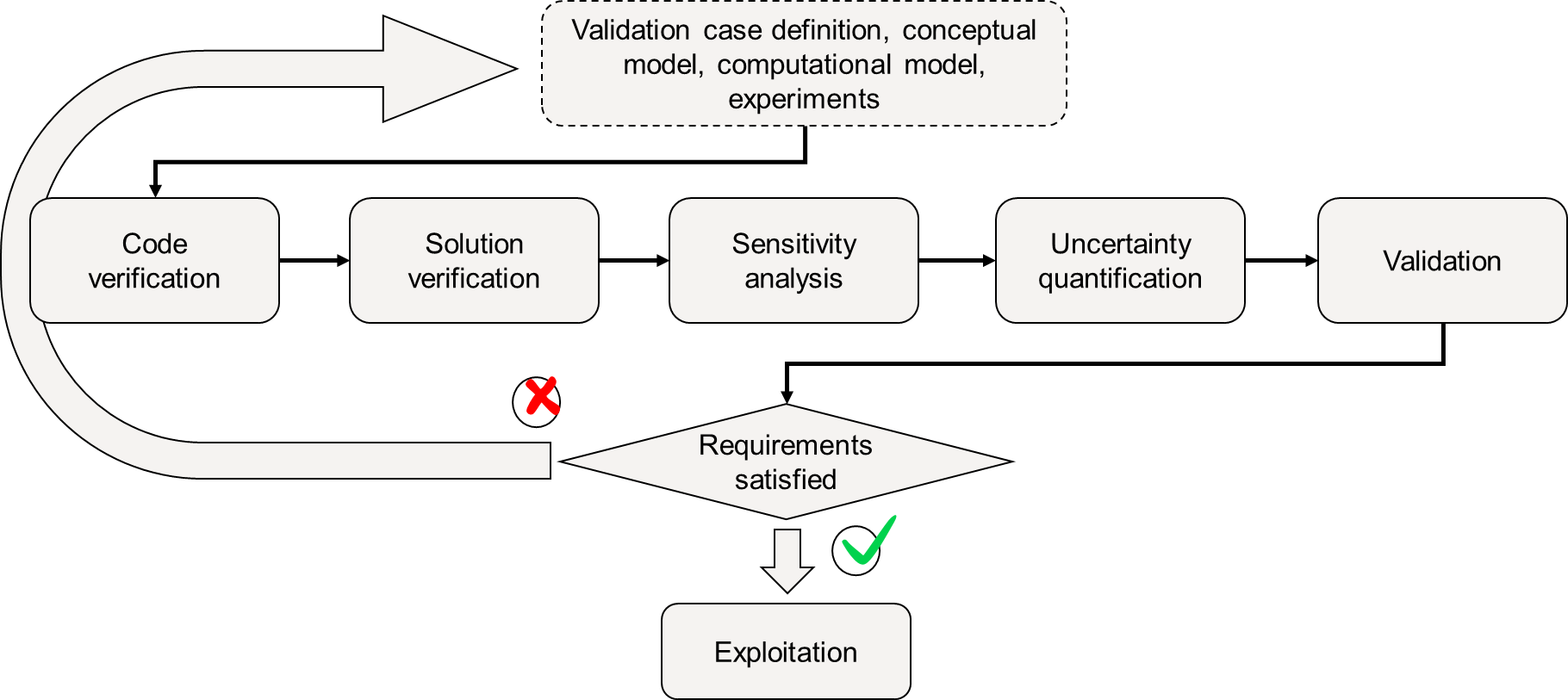
A wrapper for analysis methods: standard analysis methods are already integrated to run VV&UQ workflows (see figure below), namely code and solution verification, uncertainty quantification, sensitivity analysis, surrogate modelling or stochastic validation. Other analysis tools allows to exploit validated simulations to support design offices (e.g. generate virtual allowables).
-
Heavy models can be run on High Performance Computing (HPC) clusters, by selecting a specific model executor instead of the default interactive executor.
-
Model and analysis settings can be arbitrarily complex thanks to Pydantic, which allows an Object-Oriented settings definition, and also ensures verification of the passed settings.
-
Model and analysis wrappers integrate traceability and storage capabilities (database), based on MLflow tracking.
Using this framework ensures a consistent way of building and capitalising M&S and analysis methodologies. It avoids (re)developing generic capabilities, in particular traceability and storage of simulation and analysis data which directly contributes to increasing the credibility of simulations.
VIMSEO helps the model developers and analysis experts integrate VV&UQ-ready capabilities, enabling them to set up and run tailored VV&UQ processes to assess their credibility.
Use Cases
- I want to capitalise modelling capabilities (analytical, FEM, CFD, ...)
- I want to execute a model remotely, possibly on HPC
- I want to assess the credibility of a model through the framework of VV&UQ
- I want to identify model parameters based on a set of reference data, through a calibration sequence
- I want to propagate input uncertainties to model outputs
- I want to assess time/space discretisation error of a model
- I want to perform stochastic validation of a model (i.e. using stochastic error metrics) based on a set of reference data capturing input uncertainties
- I want to transfer modelling and analysis capabilities from experts to engineers
- I want to build a database of model results and analysis results, for a-posteriori analysis of model accuracy and adequacy for a given application
⚡ Quick Start
Model exploration
VIMSEO integrates (among others) a model that represents a straight beam subjected to different bending load cases and boundary conditions. It is based on Bernoulli hypothesis and a linear isotropic material.
In this first quick start, the user entry point is scripting mode in Python.
The model is first created.
The MLflowArchive manager is chosen such that the results are store
in a local MLflow database.
Then, the material associated with the model, characterised by a stochastic Young modulus and Poisson's ratio, is sampled on 20 points with a Latin Hypercube.
from __future__ import annotations

from vimseo.api import create_model
from vimseo.core.model_settings import IntegratedModelSettings
from vimseo.tools.doe.doe import DOEInputs
from vimseo.tools.doe.doe import DOESettings
from vimseo.tools.doe.doe import DOETool

model_name = "BendingTestAnalytical"
load_case = "Cantilever"
model = create_model(
    model_name,
    load_case,
    model_options=IntegratedModelSettings(
        directory_archive_root=f"mlflow_archive/visualize_model_result",
        directory_scratch_root=f"scratch/visualize_model_result",
        archive_manager="MlflowArchive",
    ),
)

tool = DOETool()
tool.execute(
    inputs=DOEInputs(
        model=model, parameter_space=model.material.to_parameter_space()
    ),
    settings=DOESettings(n_samples=20),
)
tool.execute()
tool.save_results()
tool.plot_results(tool.result, show=True)
The database GUI is then opened to explore the results:
mlflow ui --backend-store-uri file:\\\\\\C:\\Users\\john.doe\\sandbox\\mlflow_archive\\visualize_model_result
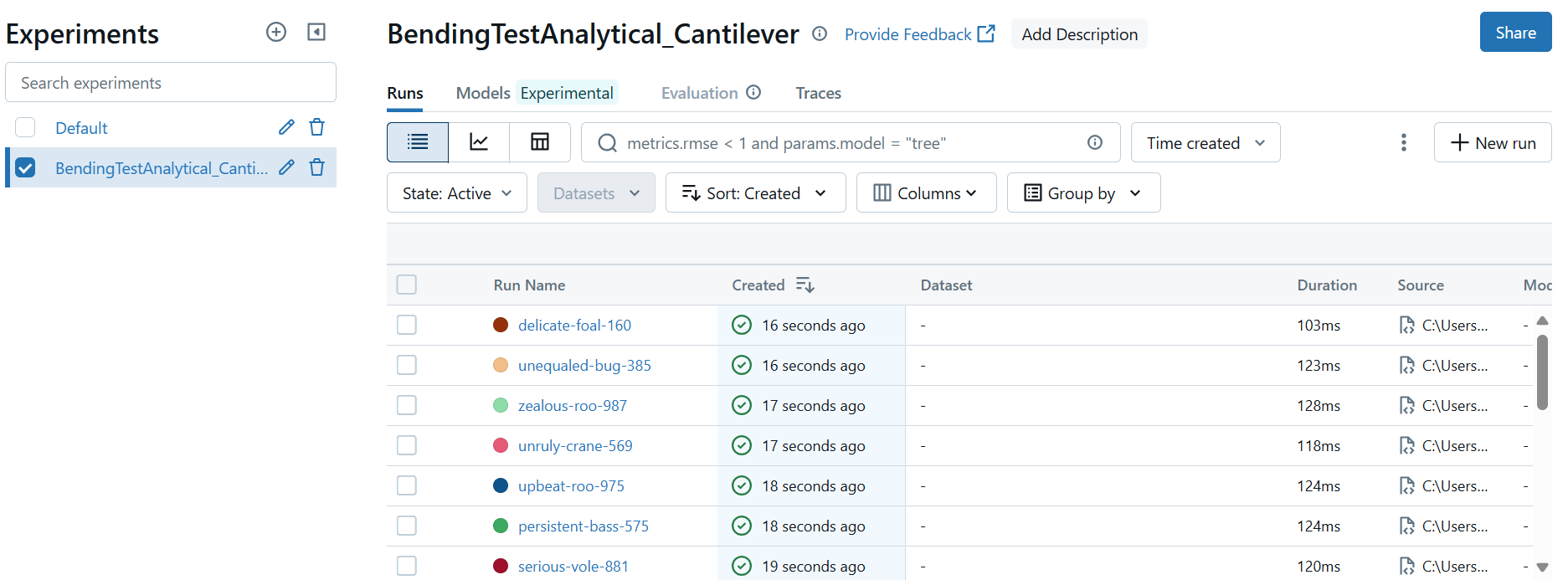
All simulation runs have been stored. The GUI allows to query some runs based on a SQL-like syntax (see MLflow Tracking for more information).
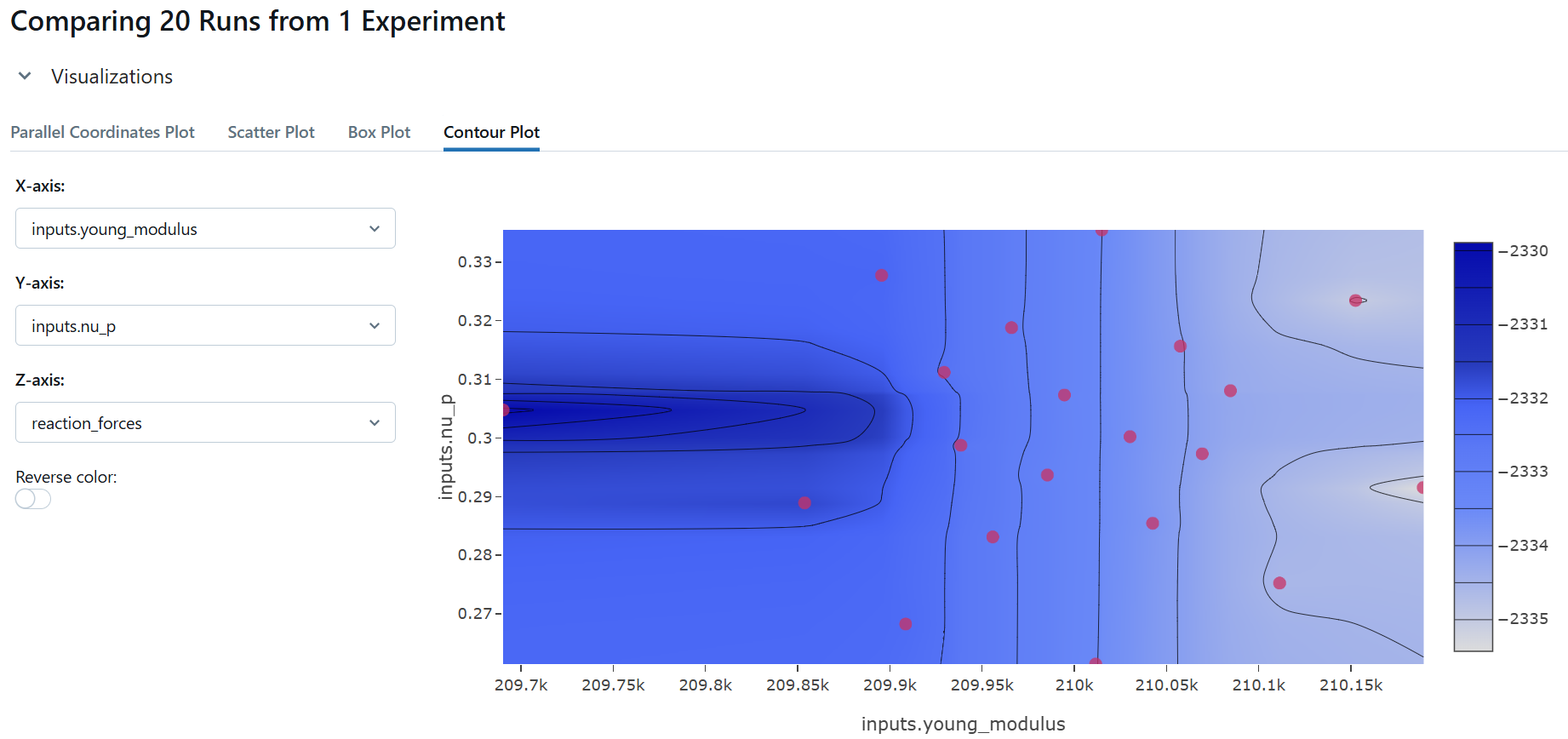
The GUI also proposes basic exploration visualisations. In this contour plot, in the central region, we see vertical isolines, indicating that the beam's reaction force only depends on the Young modulus. It is effectively the case since in this simple analytical model, Poisson's ratio is not taken int account. The complex isolines on the right and left borders are artefacts due to a lack of sampling.
Sensitivity analysis
In this second quick start, the user's entry points is a dashboard.
The dashboard_workflow allows to define a workflow of model analysis:
dashboard_workflow
Here a sensitivity analysis on the above linear beam model is defined, exploring a parameter space defined by the geometry of the beam:
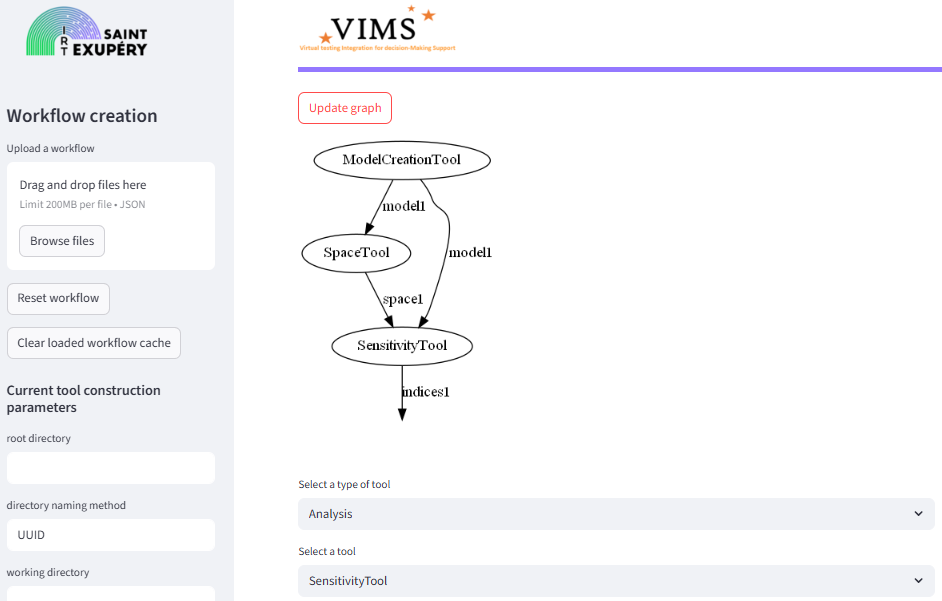
The workflow can be downloaded as a JSON file.
It means that a workflow can be fully serialised in a human-readable format.
Then, the workflow can be executed through the workflow_executor command,
to which the path to the workflow JSON file is passed:
workflow_executor.exe C:\\Users\\john.doe\\Downloads\\john.doe_2025-10-03_T10-01-04_Workflow.json
Workflow results: {'model1': BendingTestAnalytical
   Inputs: height, imposed_dplt, length, nu_p, relative_support_location, width, young_modulus
   Outputs: cpu_time, date, description, directory_archive_job, directory_archive_root, directory_scratch_job, directory_scratch_root, dplt, dplt_at_force_location, dplt_grid, error_code, job_name, load_case, location_max_dplt, machine, maximum_dplt, model, moment, moment_grid, n_cpus, persistent_result_files, reaction_forces, user, vims_git_version, 'space1': Parameter space:
+--------+-------------+-------------------+-------------+-------+--------------------------------------------------+--------------------+
| Name   | Lower bound |       Value       | Upper bound | Type  |               Initial distribution               | Transformation(x)= |
+--------+-------------+-------------------+-------------+-------+--------------------------------------------------+--------------------+
| length |     570     | 604.0714700028468 |     630     | float | Triangular(lower=570.0, mode=600.0, upper=630.0) |      Trunc(x)      |
| width  |     28.5    | 30.78498297907959 |     31.5    | float |  Triangular(lower=28.5, mode=30.0, upper=31.5)   |      Trunc(x)      |
| height |      38     | 41.63483214184417 |      42     | float |  Triangular(lower=38.0, mode=40.0, upper=42.0)   |      Trunc(x)      |
+--------+-------------+-------------------+-------------+-------+--------------------------------------------------+--------------------+,
'indices1': MorrisAnalysis.SensitivityIndices(mu={'reaction_forces': [{'length': array([220.64039355]), 'width': array([-112.47100512]), 'height': array([-424.28003754])}]}, mu_star={'reaction_forces': [{'length': array([643.73448155]), 'width': array([112.47100512]), 'height': array([424.28003754])}]}, sigma={'reaction_forces': [{'length': array([678.48213518]), 'width': array([23.12801862]), 'height': array([132.24363825])}]}, relative_sigma={'reaction_forces': [{'length': array([1.05397824]), 'width': array([0.20563539]), 'height': array([0.31168951])}]}, min={'reaction_forces': [{'length': array([335.89282962]), 'width': array([92.30668277]), 'height': array([287.39919242])}]}, max={'reaction_forces': [{'length': array([1040.80989219]), 'width': array([148.73381196]), 'height': array([631.69372198])}]})}
The result of the analysis defined in each workflow step is stored on disk, in a directory having the name of the analysis.
Key Features
- Model wrapping: with specific approach for mesh-based models: a flexible pre-run-post approach allows to reuse pre or post-processings, that are defined separately of the model run on the built mesh. In addition to reducing the code-base for model integration, reusing pre and post-processing for several models ensures that the same meshing approach and boundary condition modelling is used, which is a key aspect when validating several models using the same model form declined for different geometries and boundary conditions.
- Storage: of model results and analysis results
- Scalability for heavy numerical models: with custom HPC executors for each HPC platform and solver.
- Building block analysis tools for UQ&M and VV&UQ workflows:
- Identification of model parameters through user-defined calibration sequence: with uncertainty information on the calibrated quantities and versatile calibration metrics taking scalar, vector or curve outputs.
- Easy creation of standard VV&UQ workflows:
- Handling of scalar and vector quantities: probability distributions on vector quantities can be finely defined, with dedicated marginals by component and copula. It allows to define vector parameter space with a fine control of their parametric distribution.
- Dashboards: to define workflows and visualise results in the database.
Using VIMSEO
- References and API: get the description and definition of concepts and API.
- How-to: solve practical problems by exploring runnable examples and how-to.
Learning VIMSEO
- Tutorials and Explanations: learn through discussions and tutorials about key topics.
Roadmap
-
Material Modelling
Integration of simulation models dedicated to composite materials, including damage modelling, failure initiation and structural geometries.
-
Sensitivity Analysis Methods
Development and integration of sensitivity analysis methods, including new approaches and associated quality indicators.
-
Calibration & Uncertainty Quantification
Development and integration of robust calibration methods accounting for uncertainty and variability, up to inverse and Bayesian approaches.
-
Validation & Model Error Correction
Formalisation of the validity domain and development of output space analysis methods to characterise model properties.
-
Surrogates & Active Learning
Development and integration of modern surrogate methods, including active learning and physics-informed approaches.
-
Multiscale Methods
Evaluation and integration of multiscale methods, including scale-bridging approaches to propagate coupon-level allowables up to large-scale structural reserve factor predictions.
-
Data Management, Metrics & Traceability
Test data management, development of comparison metrics between curves and fields, and computation-to-test traceability.
-
Post-processing
Generic and flexible post-processing tooling for exploitation of simulation results.
-
Infrastructure, UI & Technical Integrations
Software infrastructure evolution, user interface improvements and integrations with third-party tools.
-
Outreach & Open Source
Communication, openness and community-building actions around VIMSEO.
-
Maintenance & User Support
Recurring maintenance, support and knowledge transfer activities towards users.
License
This software was developed by IRT Saint EXUPERY within the framework of the TRUST research project and the VITAL resarch project. VIMSEO is licensed by IRT SAINT EXUPERY under the GNU LESSER GENERAL PUBLIC LICENSE, version 3.0. A copy of this license is provided in the LICENSE file.
Contribution
We welcome contributions! Please refer to the contribution guidelines.
Please use the github issue tracker to submit bugs or questions.
Contributing
Refer to our contribution guide here: Contributing
Contributors
- VIMSEO developers